The question is: how to draw smooth line (antialiased) with libGDX without using shaders and by using Batch (normally SpriteBatch) without needing to flush the batch after every draw (or at the end of drawing)?
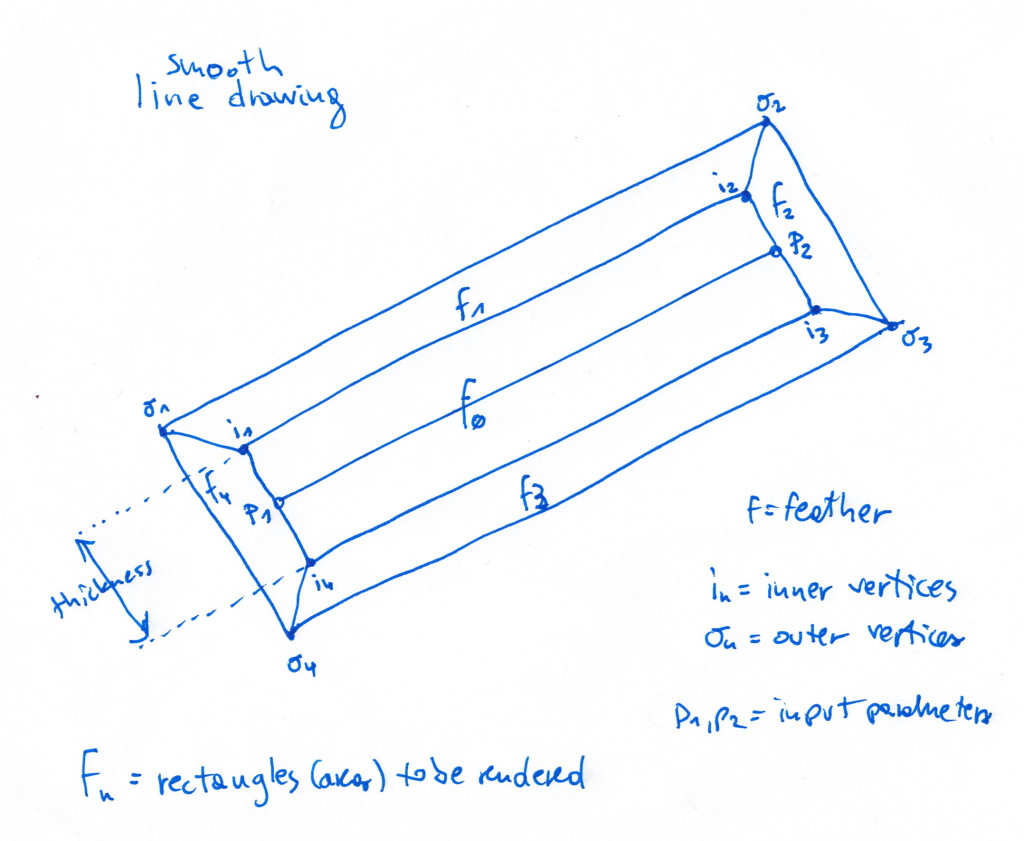
I solved this problem by drawing 5 quads using SpriteBatch. Here’s the code and diagram (they are both self-explanatory):
	/**
	 * This method draws smooth line without using shaders, so there is not need to flush batch after drawing a line.
	 * It draws 5 regions in order to create smooth line (see the diagram).
	 *
	 * @param batch batch that is in "drawing" mode (between begin() and end())
	 * @param x1 p1.x
	 * @param y1 p1.y
	 * @param x2 p2.x
	 * @param y2 p2.y
	 * @param thickness thickness of line (1 means 1 pixel thick)
	 * @param feather feather we use to create "smoothness". Value of 1.0 means we will draw the line 1 pixel outwards, slowly diminishing the alpha channel value until 0.
	 * @param color line's color
	 */
	public void line(Batch batch, float x1, float y1, float x2, float y2, float thickness, float feather, Color color) {
		/*
		 * Note that we don't set UV coordinates correctly (which are texture coordinates), since we don't
		 * really care - we just need white color value at every pixel. OpenGL takes care of it automatically
		 * (seeing we always sample pixel [0,0] it will take value at that pixel, which is white).
		 */

		Vector2 p1 = new Vector2(x1, y1);
		Vector2 p2 = new Vector2(x2, y2);

		batch.setShader(null); // just in case some shader is bound

		Vector2 h = new Vector2(p2).sub(p1).nor().rotate90(1).scl(thickness/2); // half-thickness vector (see diagram)
		Vector2 fy = new Vector2(h).nor().scl(feather); // feather vector (see diagram)
		Vector2 fx = new Vector2(fy).rotate90(-1); // feather vector (see diagram)

		// inner and outer points (see diagram)
		Vector2 i1, i2, i3, i4, o1, o2, o3, o4;
		i1 = new Vector2(p1).add(h);
		i2 = new Vector2(p2).add(h);
		i3 = new Vector2(p2).sub(h);
		i4 = new Vector2(p1).sub(h);
		o1 = new Vector2(i1).sub(fx).add(fy);
		o2 = new Vector2(i2).add(fx).add(fy);
		o3 = new Vector2(i3).add(fx).sub(fy);
		o4 = new Vector2(i4).sub(fx).sub(fy);

		float c1 = color.toFloatBits(); // inner color
		float c2 = GUIUtils.createColor(color, 0).toFloatBits(); // outer color

		batch.draw(CommonAssets.tex1x1, new float[]{
				// f1:
				i1.x, i1.y, c1, 0, 0,
				i2.x, i2.y, c1, 0, 0,
				o2.x, o2.y, c2, 0, 0,
				o1.x, o1.y, c2, 0, 0,

				// f2:
				i3.x, i3.y, c1, 0, 0,
				i2.x, i2.y, c1, 0, 0,
				o2.x, o2.y, c2, 0, 0,
				o3.x, o3.y, c2, 0, 0,

				// f3:
				i4.x, i4.y, c1, 0, 0,
				i3.x, i3.y, c1, 0, 0,
				o3.x, o3.y, c2, 0, 0,
				o4.x, o4.y, c2, 0, 0,

				// f4:
				i1.x, i1.y, c1, 0, 0,
				i4.x, i4.y, c1, 0, 0,
				o4.x, o4.y, c2, 0, 0,
				o1.x, o1.y, c2, 0, 0,

				// f0:
				i1.x, i1.y, c1, 0, 0,
				i2.x, i2.y, c1, 0, 0,
				i3.x, i3.y, c1, 0, 0,
				i4.x, i4.y, c1, 0, 0,
		},
		0, 100);
	}